Chrome 31 beta for Android brings home screen shortcuts iOS Style
Jumat, 04 Oktober 2013
0
komentar
 We’ve seen it all - the Galaxy Note 3, all new Android flagships, the new iPhones, and there is just one more big thing to surprise us this year - the Nexus 5.
  The new Nexus 5 might become the first smartphone to feature a MEMS camera. The cryptic abbreviation is not important - what’s important is that MEMS cameras can focus 7 times faster than current cameras and take multiple images extremely fast. Those extremely quick capture times will allow for a quick succession of shots, and if the object is not moving fast, you'd be able to shoot first and focus later, like on a Lytro camera.
 The Nexus 5 is the perfect device for stock Android lovers since it will be the first one to launch with the newest Android 4.4 KitKat, and is likely to be in the frontlines for updates in the next two years or so.
 |
 Specs
Specs The popular video-on-demand service Hulu Plus is now compatible with Chromecast. The service, which offers up programming from a number of major networks for a small monthly fee, pledged to officially support Chromecast back in July, but is only now making good on that promise. Hulu is rolling out the new feature through an update to its Hulu Plus apps for Android and iOS phones and tablets. The updated apps will have a "Cast" button for one-touch streaming to Chromecast.
Google has, until now, supported Hulu Plus through its "tab casting" feature, which lets you stream the contents of any browser tab to your TV. However, the experience through tab casting isn't perfect, and the new feature should improve support significantly. Hulu Plus is one of the first premium video options to natively support Chromecast since the streaming stick launched with Netflix and Pandora support, but other popular video services like HBO are also said to be working on support. The new apps will be available today from both Apple's App Store and the Google Play store.
Via the verge

Google today announced the launch of Web Designer, a new tool for building interactive HTML5 sites and ads. The company first hinted at this launch in June, but had been quiet about it ever since. Web Designer, which Google calls a “professional-quality design tool,” is now officially in public beta and available for download for Mac and Windows.
As Google notes in today’s announcement, Web Designer was developed to allow advertisers to easily create HTML5 ads for mobile and desktop. Until recently, Google argues, advertisers “didn’t have the tools they needed to easily develop content fit for today’s cross-screen experiences” and Web Designer aims to be the tool to create these experiences.
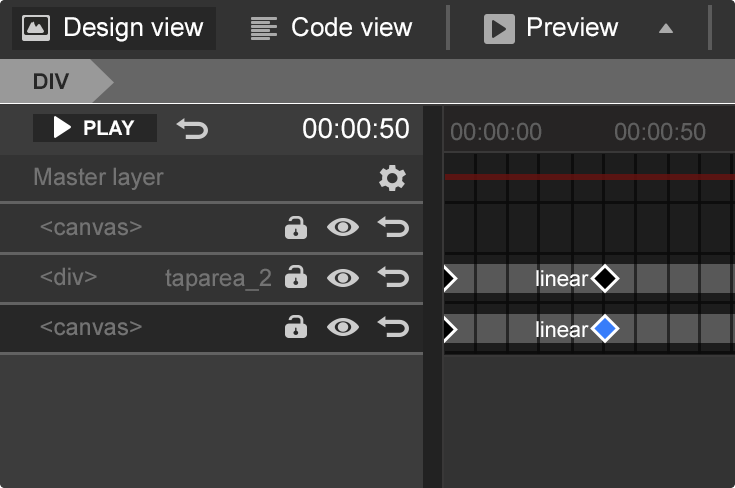
At its core, Web Designer is a visual tool, but you can also delve right into the JavaScript and CSS to fine-tune different aspect of your site. Indeed, Web Designer allows you to manipulate all of your code directly in a built-in editor and lets you quickly preview your creations in every browser you have installed on your machine.
The tools come with all the usual visual design tools you’re probably familiar with. Some of the more interesting ones Google has developed for Web Designer include a pen tool for free drawing, as well as a timeline for managing your animations. Web Designer also features the ability to create 3D content using the power of CSS3, as well as a set of pre-built components for galleries, maps and embedded YouTube videos.
For animations, one of the core features of the application, Web Developer features a Quick mode for building animations scene by scene and an advanced mode that gives designers more control over each of the elements on the page.
It’s worth noting that projects like Adobe Muse, Reflow and others include most of Web Designer’s features, too. But by making Web Designer available for free, Google is putting quite a bit of pressure on the incumbents in this space.
Google provides search and advertising services, which together aim to organize and monetize the world’s information. In addition to its dominant search engine, it offers a plethora of online tools and platforms including: Gmail, Maps, YouTube, and Google+, the company’s extension into the social space. Most of its Web-based products are free, funded by Google’s highly integrated online advertising platforms AdWords and AdSense. Google promotes the idea that advertising should be highly targeted and relevant to users thus providing...


If you’re a developer who writes mobile apps for a living, chances are that you’ve at least experimented with mobile ads in the past. Far more true than on other competing platforms, the Android app developer ecosystem is essentially driven by in-app advertisements rather than upfront payments.
This is a topic we broached some time ago, when we presented a thread with various developers’ experiences with different monetization strategies. Long story short: Ads and in-app purchases seem to be far more powerful tools in your monetization arsenal than upfront paid apps.
This should all come as no surprise for a variety of reasons. One of the main driving forces for this primarily ad-based monetization is that most Android users have come to expect free functionality thanks to Google’s extremely comprehensive ad-supported services. Starting with class leading search, the company has continued to offer some of the best solutions for maps, email, calendar hosting, translation, note keeping, and much more. Most of the company’s services are offered for free to end users, at the expense of mobile ads. So when your core operating system’s provider has built an empire based on “free,” why would you want to part ways with your hard earned cash for some cell phone fart app that you probably won’t use in a month?
While ads may seem like a sort of saving grace to developers in the face of a community that refuses to pay for apps and services, ad-based monetization isn’t always a perfect solution. We’ve talked about some of the problems when ad providers go too far, and the impact this has on the applications’ users. Aggressive advertising that breaks an end user’s trust is unethical. And aside from the questionable ethics, it’s simply not sustainable as a means of monetization. This is because users will simply lose trust for a developer that uses these types of ad networks.
However, the problem with certain implementations of ad-based monetization goes beyond simply shady ad networks. Certain applications, perhaps even ones that you’ve tried and promptly uninstalled, place annoying and intrusive advertisements in your notification bar or ad-based shortcuts on your home screen. This is simply unacceptable from an end-user perspective. Thankfully, Google is now putting an end to these practices.
According to VentureBeat, Google has made two very important changes to the Google Play Developer Program Policies. Thanks to the changes, applications can no longer place advertisements in the notification bar, and they can no longer create ad-based shortcuts on your launcher. Developers with offending applications now have 30 days to update their apps. Beyond that time, applications found to be in violation will likely be removed from the Play Store.
If you’re a developer who currently uses these types of advertisements, your initial reaction may be one of anger towards the new policy change. However, this isn’t necessarily a bad thing for you—even if you have to rethink your monetization strategies. In fact, we think it’s more than likely a win-win scenario for both end users and developers. End users feel more confident in your applications, and application developers likely acquire more users.
Are you a developer who relies on ad-based monetization? Are you an end user who has experienced these aggressive advertisements in the past? Let us know what you think of these policy changes in the comments section below!
Via XDA


